
Lawn Care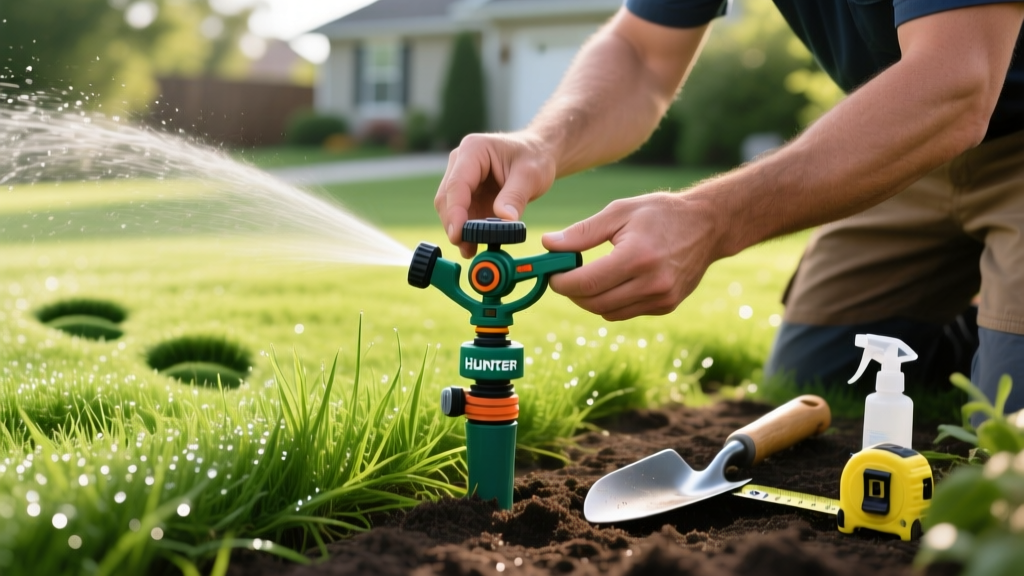
Hunter PGP Sprinkler Head Adjust: Step-by-Step Arc & Radius Guide
Understanding the Hunter PGP Rotor Series
The Hunter PGP (Pro Gear-Driven) rotor has been the backbone of residential and commercial irrigation for decades. While the legacy PGP-Ultra was retired and replaced by the I-20 series, the current PGP-Adj (Adjustable) model remains the industry standard for customizable rotary watering. Properly calibrating these rotors is critical; an unadjusted head wastes up to 30% of its water output on sidewalks, driveways, and non-target areas. According to the EPA WaterSense program, outdoor water use accounts for nearly 30% of total household water consumption, making precise sprinkler head adjustment a high-impact conservation strategy.
This guide provides exact, field-tested procedures for adjusting the arc, radius, and flow rate of your Hunter PGP sprinkler heads, along with a troubleshooting matrix for common mechanical failures.
Essential Tools for PGP Adjustment
Do not attempt to adjust a Hunter rotor with pliers or standard screwdrivers, as this will strip the plastic turret and void the warranty. Gather these specific tools before starting:
- Hunter Plastic Adjustment Wrench: The proprietary dual-ended tool (usually blue or grey) with a socket for the arc adjustment and a hex end for nozzle changes.
- Small Flathead Screwdriver: Required specifically for the radius reduction screw located at the top of the nozzle.
- Hunter Nozzle Rack (Optional): If your current precipitation rate is mismatched, you will need replacement Hunter Standard or MPR (Matched Precipitation Rate) nozzles ranging from 1.5 to 4.0 GPM.
- Teflon Tape: For resealing nozzles if you swap them out to fix pressure issues.
Step 1: Adjusting the Arc (Left and Right Stops)
The PGP-Adj allows for an arc adjustment between 50° and 360°. The left stop is fixed internally, meaning you must set the left boundary first, then dial in the right boundary.
Setting the Fixed Left Stop
- Grasp the top of the sprinkler turret and rotate it all the way to the left (counter-clockwise) until you feel it stop. This mechanical stop is your absolute left boundary.
- While holding the turret at this left stop, observe where the water stream will hit. If the left stop is pointing at your driveway, you must physically unscrew the entire rotor body from the PVC swing joint or flex pipe underground and re-thread it to face the correct leftward starting point.
Dialing in the Right Stop
- From the fixed left stop, rotate the turret to the right (clockwise) to your desired right boundary.
- Locate the arc adjustment socket on top of the turret (marked with a plus and minus symbol).
- Insert the socket end of the Hunter plastic wrench into the adjustment hole.
- Turn the wrench clockwise to increase the arc (up to 360°) or counter-clockwise to decrease it (down to 50°). Each full 360-degree turn of the wrench adjusts the arc by exactly 90 degrees.
- Run the zone to verify the coverage. Fine-tune by turning the wrench in quarter-turn increments until the right stop perfectly aligns with your lawn edge.
Step 2: Adjusting the Radius and Flow Rate
If your rotor is overspraying into a neighbor's yard or a flower bed, you do not need to change the nozzle immediately. The PGP features a built-in radius reduction screw that can decrease the throw distance by up to 25% without altering the nozzle's GPM (Gallons Per Minute) rating.
- Locate the small metal or plastic screw at the very top center of the nozzle turret.
- Using your small flathead screwdriver, turn the screw clockwise to lower the trajectory and reduce the radius.
- Turn the system on and observe the throw distance. Make quarter-turn adjustments until the water lands exactly on the target boundary.
Warning: Do not overtighten the radius reduction screw. Forcing it past the point of resistance will strip the internal threads or crack the nozzle housing, resulting in a geyser effect that requires a full head replacement.
Step 3: Nozzle Sizing and MPR Matching
A common mistake in irrigation design is mixing nozzle sizes on the same zone. If a zone contains both full-circle (360°) and half-circle (180°) rotors, the half-circle rotors will apply water twice as fast as the full-circle rotors, leading to localized flooding and runoff.
To solve this, upgrade your PGP heads to Hunter MPR (Matched Precipitation Rate) nozzles. MPR nozzles are engineered so that a 180° nozzle outputs exactly half the GPM of a 360° nozzle, ensuring uniform water distribution across the entire zone. Refer to the Hunter Industries rotor catalog to match your specific PGP model with the correct MPR nozzle rack.
Hunter PGP Troubleshooting Matrix
| Symptom | Probable Cause | Field Fix |
|---|---|---|
| Rotor fails to rotate or stalls | Debris clogging the internal filter screen or gear drive. | Pull the turret up, unscrew the nozzle, remove the rubber filter screen, rinse it, and flush the line by running the zone without the nozzle for 10 seconds. |
| Arc adjustment slips back | Worn internal planetary gears (common in PGP-Ultra models over 10 years old). | Gears are not user-serviceable. Replace the entire rotor body with a modern PGP-Adj or I-20 model. |
| Misting and wind drift | Zone pressure exceeds 60 PSI, or nozzle GPM is too low for the operating pressure. | Install a Hunter Pro-Spray PRS40 pressure-regulating stem, or swap to a higher GPM nozzle (e.g., move from 2.0 to 3.0 GPM). |
| Water leaks from the top cap | Missing or degraded rubber O-ring on the nozzle turret. | Unscrew the turret, replace the #112 or #212 O-ring (depending on exact PGP generation), and apply silicone lubricant. |
Pro Tips for Maximizing Irrigation Efficiency
The 'Catch Cup' Test: Before finalizing your radius and arc adjustments, place 5 identical flat-bottomed catch cups (or empty tuna cans) in a grid across the rotor's spray pattern. Run the zone for exactly 15 minutes. Measure the water depth in each cup with a ruler. If the variance between the cups is greater than 0.25 inches, your head spacing is flawed, or your nozzle GPM is mismatched for the arc.
Furthermore, always adjust your rotors during the early morning hours when wind speeds are below 5 MPH. Wind deflection can artificially alter the perceived arc and radius, leading to inaccurate adjustments that become obvious once the afternoon breeze picks up.
Frequently Asked Questions
Can I adjust the Hunter PGP while the water is running?
Yes, and it is highly recommended. Adjusting the arc and radius while the system is pressurized allows you to see the exact water trajectory in real-time. However, ensure you do not stand directly over the turret when making arc adjustments, as the gear drive can snap back if the wrench slips.
Why is my PGP-Adj popping up but not spraying water?
This is almost always caused by a completely clogged filter screen or a closed zone valve. First, check the valve manifold to ensure the solenoid is opening. If the valve is open and water is reaching the head, unscrew the nozzle and pull out the cylindrical filter screen. Root intrusion and sand buildup frequently block this screen in older lawns.
How often should I recalibrate the arc and radius?
You should perform a full arc and radius audit twice a year: once in early spring during system startup, and once in late autumn during winterization. Seasonal temperature shifts can cause minor ground heaving that tilts the rotor body, altering the spray trajectory by up to 15 degrees over time.