Lawn Care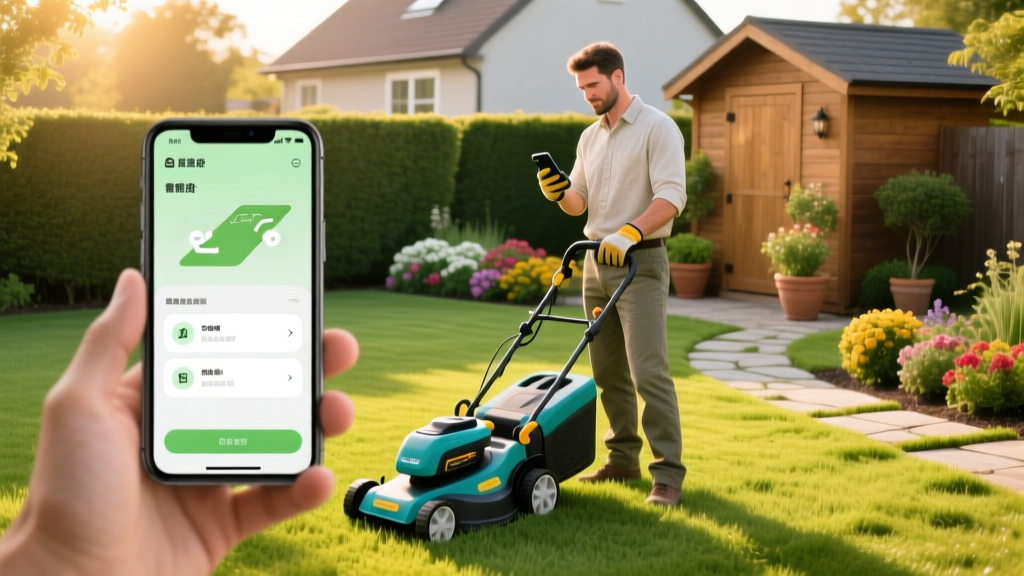
How to Use a Lawn Mowing App for Step-by-Step Yard Maintenance
The Core Components of a Modern Lawn Care App Stack
Transitioning from manual push-mowing to an automated, app-driven routine requires understanding the two distinct types of lawn mowing apps available in 2026. Relying on a single application rarely covers the full spectrum of turf management. A complete step-by-step lawn maintenance procedure leverages a hybrid stack: robotic control apps for weekly micro-mulching and gig-economy service apps for heavy seasonal renovations.
| App Category | Primary Function | Top 2026 Platforms | Average Cost |
|---|---|---|---|
| Robotic Mower Control | GPS mapping, daily scheduling, weather delays | Husqvarna Automower Connect, Worx Landroid, Segway Navimow | $0 - $11.99/month |
| Service Booking (Gig-Economy) | Aeration, dethatching, overseeding, fall cleanup | GreenPal, LawnStarter, Yardbook | $45 - $150 per service |
By integrating these platforms, homeowners eliminate the 15 to 20 hours of annual manual mowing labor while improving turf health through precise, algorithm-driven cuts. According to the EPA Safe Pest Control and Lawn Care guidelines, maintaining optimal grass height and reducing soil compaction from heavy manual mowers are critical steps in preventing weed invasion and minimizing chemical herbicide use.
Step 1: Mapping and Zoning Your Yard via GPS
The foundation of any robotic lawn mowing app procedure is establishing accurate boundary parameters. In 2026, the industry has largely shifted away from burying 14-gauge boundary wires toward RTK (Real-Time Kinematic) GPS and LiDAR mapping.
Executing the RTK Mapping Procedure
- Install the Reference Station: Mount the RTK base station on a fixed, unobstructed surface (like a roof eave or fence post) with a clear view of the sky. This ensures the 1-inch accuracy required to keep the mower off flower beds.
- Walk the Perimeter: Open your lawn mowing app and select 'Create New Map'. Walk the exact perimeter of your turf holding your smartphone. The app uses your phone's GPS combined with the base station's RTK corrections to draw the digital boundary.
- Define Keep-Out Zones: Manually draw polygons around tree trunks, sprinkler heads, and garden edges within the app. Set a 6-inch buffer zone around these obstacles to prevent the mower's blades from scalping the roots or damaging the plastic casings.
- Establish Guide Wires (If Applicable): For properties with narrow passages (less than 5 feet wide), use the app to program a 'guide wire' path. This directs the mower back to the charging station without relying solely on random bounce algorithms, saving battery life and reducing edge-wear patterns.
Step 2: Programming the Weekly Mowing Algorithm
Manual mowing typically occurs once a week, often violating the '1/3 rule' (never removing more than one-third of the grass blade in a single pass). A robotic lawn mowing app solves this by scheduling daily or every-other-day micro-cuts, which act as a natural mulching fertilizer.
To program your app correctly, you must align the cutting height and schedule with your specific turfgrass species. The NC State University TurfFiles database provides the definitive agronomic standards for these measurements.
| Grass Type | Target App Height Setting | Optimal App Frequency | Seasonal Adjustment Protocol |
|---|---|---|---|
| Bermudagrass (Warm) | 1.0 - 1.5 inches | Daily (Morning) | Raise to 2.0 inches during peak August heat stress |
| Kentucky Bluegrass (Cool) | 2.5 - 3.5 inches | Every 48 hours | Raise to 4.0 inches in summer to shade soil |
| Tall Fescue (Cool) | 3.0 - 4.0 inches | Every 48 hours | Maintain 4.0 inches year-round for deep root insulation |
| Zoysia (Warm) | 1.5 - 2.5 inches | Every 72 hours | Lower to 1.5 inches in early spring to remove winter dormancy |
Pro-Tip: Weather-Adaptive Scheduling
Enable the 'Weather Guard' or 'Rain Delay' API integration within your lawn mowing app. When local meteorological data indicates soil moisture levels exceeding 30% or active precipitation, the app will automatically suspend the mowing schedule. Mowing saturated turf causes severe soil compaction, ruts, and the spread of fungal pathogens like Brown Patch (Rhizoctonia solani).
Step 3: Integrating Seasonal Maintenance via Service Apps
While a robotic lawn mowing app handles the weekly cuts, it cannot perform deep-tine aeration, dethatching, or overseeding. For these step-by-step seasonal procedures, you must transition to a service booking app like GreenPal or LawnStarter.
The Fall Renovation Sequence
- Early September (Core Aeration): Use your service app to book a core aeration. Specify in the job notes that you need 2-to-3-inch deep plugs extracted at 3-to-4-inch spacing. This relieves the compaction caused by summer foot traffic and prepares the soil seedbed.
- Mid-September (Overseeding): Book a follow-up service through the app to apply turf-type tall fescue or Kentucky bluegrass seed at a rate of 5 to 8 pounds per 1,000 square feet. The app's messaging feature allows you to share your exact yard square footage (calculated automatically by your robotic mower's GPS map) with the contractor.
- October (Winterizer Fertilization): Schedule a late-fall application of a high-potassium winterizer fertilizer (e.g., 10-0-14 NPK ratio) to promote root carbohydrate storage before the first freeze.
Troubleshooting Common App-to-Mower Sync Failures
Even the most advanced Husqvarna Automower Technology and Worx Landroid systems experience connectivity dropouts. Here is how to resolve the most common synchronization errors:
- 2.4GHz vs. 5GHz Band Conflict: Most robotic mower charging docks utilize 2.4GHz WiFi chips due to their superior range and wall penetration. If your mesh router uses a unified SSID (network name) for both bands, the mower may repeatedly attempt to connect to the 5GHz band and fail. Fix: Create a dedicated 2.4GHz IoT network on your router specifically for the mower dock.
- RTK Signal Loss in Tree Canopy: If your app shows the mower 'hunting' for a signal or stopping near large oak or pine trees, the dense canopy is blocking the satellite telemetry required for RTK GPS. Fix: Use the app to draw a physical exclusion zone under heavy canopies and switch to a secondary boundary wire or ultrasonic sensors for that specific zone.
- Cellular Dead Zones: For mowers relying on built-in 4G/LTE cellular connections (bypassing home WiFi), thick stucco walls or metal roofing can block the signal. Fix: Relocate the charging station to the side of the house facing the nearest cellular tower, or install a weatherproof external 4G antenna on the dock.
Frequently Asked Questions
Can I use a lawn mowing app to track the exact cost per square foot of my yard care?
Yes. Premium robotic mower apps include a 'Statistics' dashboard that tracks total distance driven, energy consumed (measured in kWh), and blade motor runtime. By dividing your monthly electricity cost and annual blade replacement cost by your yard's square footage (mapped in the app), you can calculate your exact maintenance cost. Typically, robotic mowing costs between $0.002 and $0.005 per square foot annually, compared to $0.015+ for manual mowing fuel and depreciation.
How do I prepare the lawn mowing app for winter storage?
Do not simply turn off the mower. Open the app and select the 'Winterize' or 'Long-Term Storage' protocol. This commands the mower to charge to exactly 50% capacity (the optimal voltage for lithium-ion battery preservation) and disables all scheduled cuts. Remove the battery, store it indoors in a climate-controlled space between 50°F and 70°F, and leave the dock powered on if it features built-in frost protection circuitry.
Will the app notify me if the mower gets stuck or stolen?
Modern apps feature geo-fencing and lift-sensor alerts. If the mower is lifted or tilted beyond 35 degrees, the app immediately pushes a high-priority notification to your phone and sounds a 105-decibel onboard alarm. If the mower crosses the digital geo-fence boundary you set in the app, it triggers GPS tracking mode, updating its location every 10 seconds to aid in recovery.