Home & Garden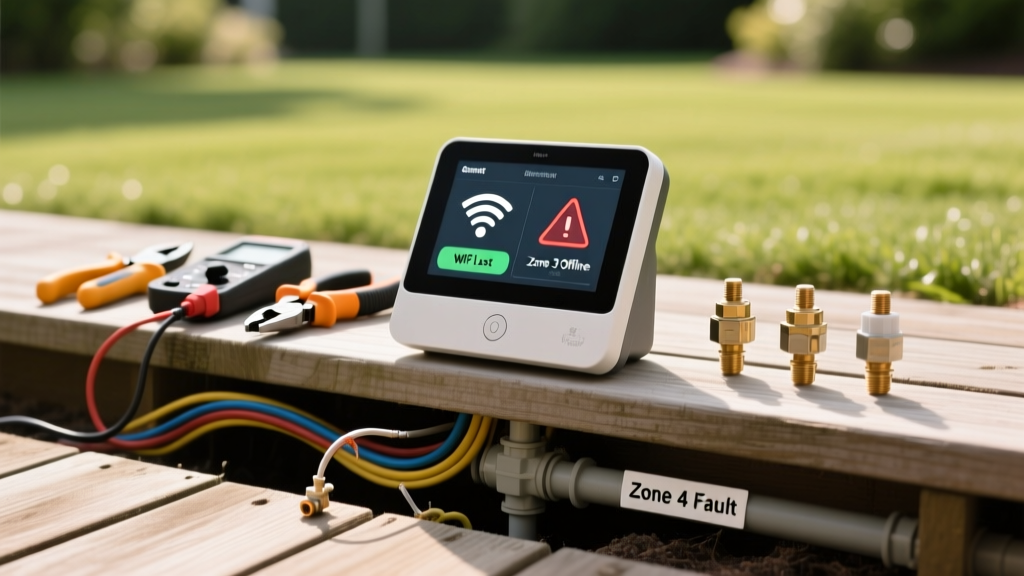
Troubleshooting Smart Irrigation: Wi-Fi and Zone Errors
Robert HayesPublished
The Rise of Smart Irrigation and Common Pitfalls
Smart irrigation controllers, such as the Rachio 3, Orbit B-hyve, and Rain Bird ST8, have revolutionized residential lawn care. By leveraging local weather data, soil moisture tracking, and seasonal adjustments, these devices bridge the gap between effortless home automation and energy-efficient landscaping. According to the EPA WaterSense program, upgrading to a smart irrigation controller can save the average home nearly 7,600 gallons of water annually. However, integrating outdoor hardware with indoor Wi-Fi networks and complex underground wiring inevitably leads to technical hiccups. When your system fails to communicate, skips scheduled watering, or floods a specific zone, diagnosing the root cause requires a systematic approach. This guide provides actionable, step-by-step solutions for the most common smart irrigation problems, helping you restore your garden-to-table oasis without wasting water or money.
Diagnosing Wi-Fi and Connectivity Dropouts
The most frequent complaint among smart irrigation users is the controller repeatedly showing as 'offline' in the companion app. Because irrigation controllers are typically installed in garages, basements, or on the side of a house, they often sit at the very edge of your router's effective range. Furthermore, outdoor walls composed of brick, stucco, or concrete can severely degrade wireless signals.
Step-by-Step Wi-Fi Troubleshooting
- Verify the Frequency Band: Most smart irrigation controllers, including older generations of the Rachio and Orbit lines, only support 2.4GHz Wi-Fi networks. If your router uses a unified SSID for both 2.4GHz and 5GHz bands, the controller may fail to authenticate. Access your router settings and temporarily separate the bands, connecting the controller strictly to the 2.4GHz network.
- Check Signal Strength: Use your smartphone to test the Wi-Fi signal exactly where the controller is mounted. If you have fewer than two bars or a ping rate higher than 100ms, the signal is too weak for reliable cloud communication.
- Install a Wi-Fi Extender or Mesh Node: If the signal is weak, the most reliable solution is to install a weatherproof outdoor Wi-Fi extender or place a mesh network node near the controller. A standard TP-Link outdoor extender costs approximately $40 and takes 15 minutes to configure.
- Power Cycle and Firmware Reset: Unplug the controller's transformer from the wall for 60 seconds. Upon rebooting, the device will attempt to re-establish a handshake with your router and download any pending firmware updates that may contain connectivity patches.
Troubleshooting Zone Failures and Wiring Faults
A smart controller is only as effective as the physical wiring and solenoids it commands. If the app indicates that a zone is actively running, but no water is spraying outside, or conversely, a zone refuses to shut off, you are likely dealing with a wiring fault or a failed solenoid valve.
Using a Multimeter to Test Solenoids and Wires
To diagnose electrical issues, you will need a digital multimeter, such as the Fluke 115 or a more budget-friendly AstroAI model. Set your multimeter to measure AC Voltage (VAC). Smart irrigation transformers step down standard 120V household current to 24V AC, which is the standard operating voltage for irrigation solenoids.
- Test the Transformer: With the system powered on, place the multimeter probes on the two wires exiting the transformer. You should read between 24V and 28V AC. If the reading is zero or significantly lower, the transformer is burnt out and must be replaced (Cost: $15-$25).
- Test the Controller Terminals: Manually trigger a zone from the app or the controller's physical interface. Place one probe on the 'Common' (COM) terminal and the other on the active zone terminal. You should read 24V AC. If you do not, the internal relay for that zone has failed, requiring a full controller replacement.
- Test the Solenoid: Locate the valve box in your yard for the failing zone. Disconnect the two wires attached to the solenoid. Set your multimeter to measure Resistance (Ohms). Place the probes on the two solenoid wires. A healthy solenoid will typically read between 20 and 60 Ohms. A reading of 'OL' (Open Loop) or infinite resistance means the internal copper coil is severed, and the solenoid must be replaced (Cost: $10-$15).
Smart Controller Diagnostic Chart
Use the following diagnostic table to quickly identify the root cause of your smart irrigation anomalies and apply the correct solution.
| Symptom | Probable Cause | Diagnostic Step | Solution |
|---|---|---|---|
| Controller offline in app | Weak Wi-Fi or 5GHz band conflict | Check smartphone signal at controller; verify router band | Install 2.4GHz extender or separate router bands |
| Zone runs but no water | Failed solenoid or severed field wire | Test solenoid resistance (Ohms) at the valve box | Replace solenoid or splice broken underground wire |
| Zone will not turn off | Debris in valve diaphragm or stuck relay | Listen for continuous clicking at controller; inspect valve | Clean valve diaphragm or replace controller relay |
| System skips scheduled watering | Local weather API error or frozen rain sensor | Check app weather source; inspect physical rain sensor | Change weather station in app; clean sensor contacts |
| Display is completely blank | Tripped breaker or dead transformer | Test outlet with a lamp; test transformer output (VAC) | Reset GFCI outlet or replace 24VAC transformer |
Weather Data and Sensor Discrepancies
One of the primary benefits of smart irrigation is its ability to skip watering based on hyper-local weather data. However, this feature can become a major problem if the system pulls data from a distant weather station that does not accurately reflect your microclimate, or if a physical rain sensor becomes clogged with pollen and debris.
Fixing Weather Station Errors: Open your controller's companion app and navigate to the 'Intelligently Weather' or 'Weather Source' settings. If your system is skipping watering despite dry conditions, the selected weather station may be reporting false precipitation. Switch the data source to a closer local airport or a trusted network like Weather Underground or NOAA. Ensure your ZIP code and specific address are entered correctly to pull the most accurate evapotranspiration (ET) rates.
Maintaining Physical Sensors: If you utilize a physical wireless rain sensor or soil moisture sensor, these devices require seasonal maintenance. Rain sensors feature small cork discs that expand when wet to break the circuit. Over time, these corks dry out, crack, or become coated in dirt, causing the sensor to falsely report rain. Clean the sensor housing with a damp cloth and replace the internal cork discs every two years. For soil moisture sensors, ensure the probes are buried at the root zone depth (typically 4 to 6 inches for turfgrass) and are not surrounded by air pockets, which will yield false 'dry' readings and cause overwatering.
Repair Costs and Time Investment
Understanding the financial and temporal investment required for repairs can help you decide whether to tackle the issue yourself or call a professional. Below is a breakdown of typical repair scenarios:
- Wi-Fi Extender Installation: $40 - $80 for hardware; 30 minutes of setup time. Highly recommended for DIY.
- Transformer Replacement: $20 for the part; 20 minutes to wire. Requires basic wire nut splicing skills. (DIY Friendly)
- Solenoid Replacement: $15 for the part; 45 minutes of digging and waterproof wire splicing. (Moderate DIY)
- Severed Common Wire Repair: $30 for waterproof gel connectors and wire; 2 to 4 hours of trenching and locating the break. (Advanced DIY or Professional)
- Professional Irrigation Service Call: Expect to pay a $75 to $125 diagnostic fee, plus hourly labor rates of $65 to $95. Hiring a pro is recommended if you suspect a mainline leak or a complex wiring short that requires a wire locator tool.
Expert Insights and Authoritative Guidance
When configuring your smart controller for optimal efficiency, it is crucial to rely on established horticultural and environmental guidelines rather than guesswork. The University of Florida IFAS Extension emphasizes that while smart controllers significantly reduce water waste, they must be paired with correct zone precipitation rates and regular physical audits. According to their research on automated irrigation, a smart controller cannot compensate for broken sprinkler heads, severe wind drift, or mismatched nozzles within the same zone.
'Smart irrigation controllers are highly effective at adjusting run times based on environmental demand, but they require a baseline of proper system maintenance. A monthly visual inspection of the landscape during irrigation is essential to ensure that the technology is delivering water efficiently to the root zone.' - University of Florida IFAS Extension, Department of Agricultural and Biological Engineering.
By combining the diagnostic steps outlined above with routine physical inspections, you can ensure your smart irrigation system remains a reliable, water-saving asset to your home and garden. Whether you are nurturing a delicate vegetable garden or maintaining a sprawling turf lawn, a fully operational smart controller bridges the gap between modern convenience and responsible environmental stewardship.
